
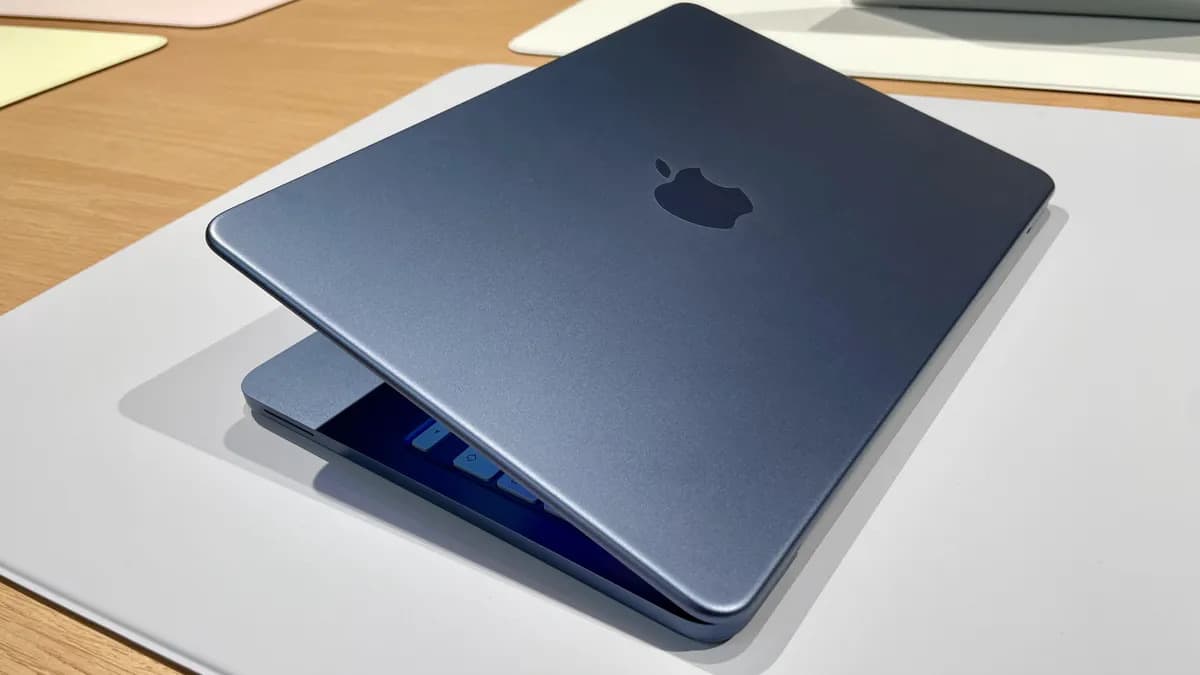
The MacBook Neo is one of the most interesting entry-level Macs Apple has released in years. But it also raises one very obvious question: is 8GB RAM enough?
That question matters because the MacBook Neo is not a high-end MacBook Pro. It is a lightweight, affordable MacBook designed for everyday use. It has the appeal of a real Mac at a lower price, but it also comes with limits. The biggest one for many buyers is memory.
Apple lists the MacBook Neo with 8GB of unified memory. For simple tasks, that can be enough. For heavy multitasking, too many browser tabs, creative apps, virtual machines, or long work sessions, it can become the reason your MacBook Neo starts to feel slower than expected.
The honest answer is not “8GB is fine” or “8GB is useless”. The honest answer is: 8GB is enough for the right user, but only if the workload stays controlled.
This guide explains whether 8GB RAM is enough for MacBook Neo, who should buy it, who should avoid it, how to check memory pressure, and how to keep the MacBook Neo feeling fast by managing apps, tabs, and background activity properly.
Quick answer: 8GB RAM is enough for MacBook Neo if you mostly browse the web, write documents, watch videos, use email, take notes, study, and run a few apps at a time. It is not ideal if you keep dozens of tabs open, use heavy creative apps, run virtual machines, edit large videos, develop large projects, or expect long-term professional multitasking. To get the best experience, control browser tabs, reduce login items, close or pause unused apps, and monitor Memory Pressure in Activity Monitor.
What 8GB RAM means on MacBook Neo
The MacBook Neo uses unified memory. That means the system shares memory across the CPU, GPU, apps, browser tabs, macOS, and background processes.
Unified memory can be efficient, but it is not magic. If too many apps and tabs are active at the same time, the Mac still has to manage limited memory.
On the MacBook Neo, 8GB RAM is enough for simple daily work, but it creates a clear ceiling. You can reach that ceiling if your workflow grows too heavy.
Memory is used by:
- macOS itself.
- Open apps.
- Browser tabs.
- Browser extensions.
- Background processes.
- Cloud sync tools.
- Menu bar utilities.
- Large files.
- Video calls.
- Creative tools.
That is why two people can have completely different experiences with the same MacBook Neo.
One user may say it feels fast. Another may say it feels limited. Both can be right. The difference is workload.
Is 8GB RAM enough for MacBook Neo?
For many users, yes. But not for every user.
The MacBook Neo with 8GB RAM makes the most sense for light and medium everyday tasks. It is not the best choice for users who treat their laptop like a portable workstation.
| User type | Is 8GB enough? | Why |
|---|---|---|
| Student writing papers, browsing, watching videos | Yes | The workload is usually light and predictable |
| Casual user with email, web, notes, streaming | Yes | 8GB is enough if tabs are controlled |
| Remote worker with browser, Slack, Zoom, documents | Maybe | It depends on tabs, calls, and background apps |
| Designer using Figma, Photoshop, many tabs | Limited | Memory pressure can appear quickly |
| Developer with local servers and heavy tools | Usually not ideal | Modern dev workflows can be memory-heavy |
| Video editor or creative professional | No | Large files and exports need more headroom |
| Heavy multitasker with 40+ tabs | No | The issue is not one app, but everything open together |
The MacBook Neo is not weak because it has 8GB RAM. It is specific. It is made for people who do not need heavy parallel workloads all day.
The real issue is not 8GB RAM. It is uncontrolled multitasking.
Most memory problems do not appear because one simple app is open. They appear because many small things accumulate.
A typical “light” MacBook Neo session can become heavy without the user noticing:
- Safari or Chrome with 25 tabs.
- Mail running in the background.
- Messages open.
- Spotify or YouTube playing.
- iCloud Drive syncing files.
- A video call app still open after a meeting.
- Three menu bar utilities refreshing data.
- A notes app, calendar app, and PDF open.
- Old apps still running after their windows were closed.
Nothing here looks extreme. But together, it can push an 8GB MacBook Neo into memory pressure.
This is why the MacBook Neo experience depends less on one spec and more on how disciplined the workload is.
How to know if 8GB RAM is becoming a problem
You do not need to guess. Use Activity Monitor.
Open Activity Monitor from Applications > Utilities, or search for it with Spotlight. Then click the Memory tab.
Look at Memory Pressure. This is more useful than obsessing over the exact amount of memory used.
| Memory Pressure | What it means | What to do |
|---|---|---|
| Green | Your MacBook Neo is handling memory well | No urgent action needed |
| Yellow | Your MacBook Neo is under memory pressure | Close tabs, quit unused apps, reduce background activity |
| Red | Your MacBook Neo is struggling | Save work, quit heavy apps, restart if needed |
Also check:
- Memory Used: how much memory is currently active.
- App Memory: how much memory apps are using.
- Compressed: how much memory macOS is compressing.
- Swap Used: how much storage is being used to help memory.
Some swap is not always a disaster. But if swap is high, memory pressure is yellow or red, and your MacBook Neo feels slow, the workload is probably too heavy.
The 5-minute MacBook Neo memory diagnosis
Before blaming the hardware, diagnose your real workload.
| Minute | What to check | What it tells you |
|---|---|---|
| 1 | Activity Monitor → Memory Pressure | Whether 8GB is currently enough for your workload |
| 2 | Apps sorted by memory | Which app is taking the most memory |
| 3 | Browser tabs and extensions | Whether the browser is the real memory problem |
| 4 | Login items and background apps | Whether your MacBook Neo starts the day overloaded |
| 5 | Swap Used and Compressed Memory | Whether macOS is working hard to compensate |
This diagnosis gives a more honest answer than any spec sheet. If your normal day keeps Memory Pressure green, 8GB is enough for you. If your normal day goes yellow or red, 8GB is already tight.
What MacBook Neo with 8GB RAM is good for
The MacBook Neo makes sense when the workflow is focused and not too heavy.
It is a good fit for:
- Web browsing with a reasonable number of tabs.
- Email.
- Writing documents.
- Taking notes.
- Watching videos.
- Online classes.
- Light spreadsheets.
- Video calls, if you keep other apps under control.
- Basic photo management.
- Everyday family use.
- Students with simple school workflows.
For this kind of use, 8GB can feel perfectly fine. The MacBook Neo can be fast, quiet, portable, and enjoyable.
The key is not opening everything at once and leaving it all running forever.
What MacBook Neo with 8GB RAM is not ideal for
The MacBook Neo is less suitable when the workload is heavy, parallel, or professional.
It is not the best choice for:
- Large video editing projects.
- Heavy Photoshop files.
- Complex Figma files with many tabs open.
- Virtual machines.
- Large development environments.
- Heavy music production sessions.
- Large spreadsheets with many formulas.
- Dozens of browser tabs plus multiple work apps.
- Running many communication apps all day.
- Users who never close anything.
It is not that the MacBook Neo cannot open these apps at all. The problem is comfort and consistency. A task may work, but the Mac can become less responsive when memory pressure builds.
Browser tabs are the biggest 8GB RAM trap
For many MacBook Neo users, the browser will be the real test.
Modern browsers are not light. A browser can contain email, documents, music, videos, AI tools, project management, social media, shopping, dashboards, cloud apps, and dozens of pages you plan to read later.
Each tab can use memory. Extensions use memory too. Heavy web apps can behave like desktop apps.
Common browser memory traps include:
- Keeping 30+ tabs open.
- Pinning too many tabs.
- Using many extensions.
- Leaving video or music pages open.
- Keeping web apps open all day.
- Restoring old sessions automatically.
- Using multiple browser profiles at once.
On a MacBook Neo, browser discipline matters more than on a Mac with more memory.
A good habit is simple: bookmark pages you do not need today and close the tab. Your future self can still find it. Your MacBook Neo does not need to keep it alive all day.
8GB RAM and video calls: what to expect
Video calls can make an 8GB MacBook Neo feel more limited because they combine camera, microphone, speakers, network, CPU, memory, and sometimes screen sharing.
A call app alone may be fine. The problem is the call plus everything else.
Before a long video call:
- Close heavy browser tabs.
- Quit apps you are not using.
- Pause unused apps with AppHalt.
- Stop cloud sync if it is not urgent.
- Avoid screen sharing more apps than needed.
- Keep only call-related apps active.
This can make the MacBook Neo feel much more stable during calls.
8GB RAM and external displays
The MacBook Neo supports one external display up to 4K at 60Hz through the USB 3 port. That is useful, but an external display often encourages heavier multitasking.
With a larger screen, users tend to open more windows, more browser tabs, more apps, and more dashboards. The display itself is not the only question. The workflow it enables can become heavier.
If you use a MacBook Neo with an external display:
- Keep browser tabs under control.
- Avoid opening every app just because there is more screen space.
- Use the left USB-C port for the display.
- Use the right USB-C port for charging when possible.
- Watch Activity Monitor if the Mac feels slower on a desk setup.
The MacBook Neo can be a good small desk machine, but its 8GB memory still needs respect.
How AppHalt helps a MacBook Neo with 8GB RAM
AppHalt is not a RAM upgrade. It does not magically turn 8GB into 16GB.
But it can help with the real-world problem that makes 8GB feel tight: too many apps staying active in the background.
On a MacBook Neo, every unnecessary background app matters more because the machine has less memory headroom than a higher-end Mac.
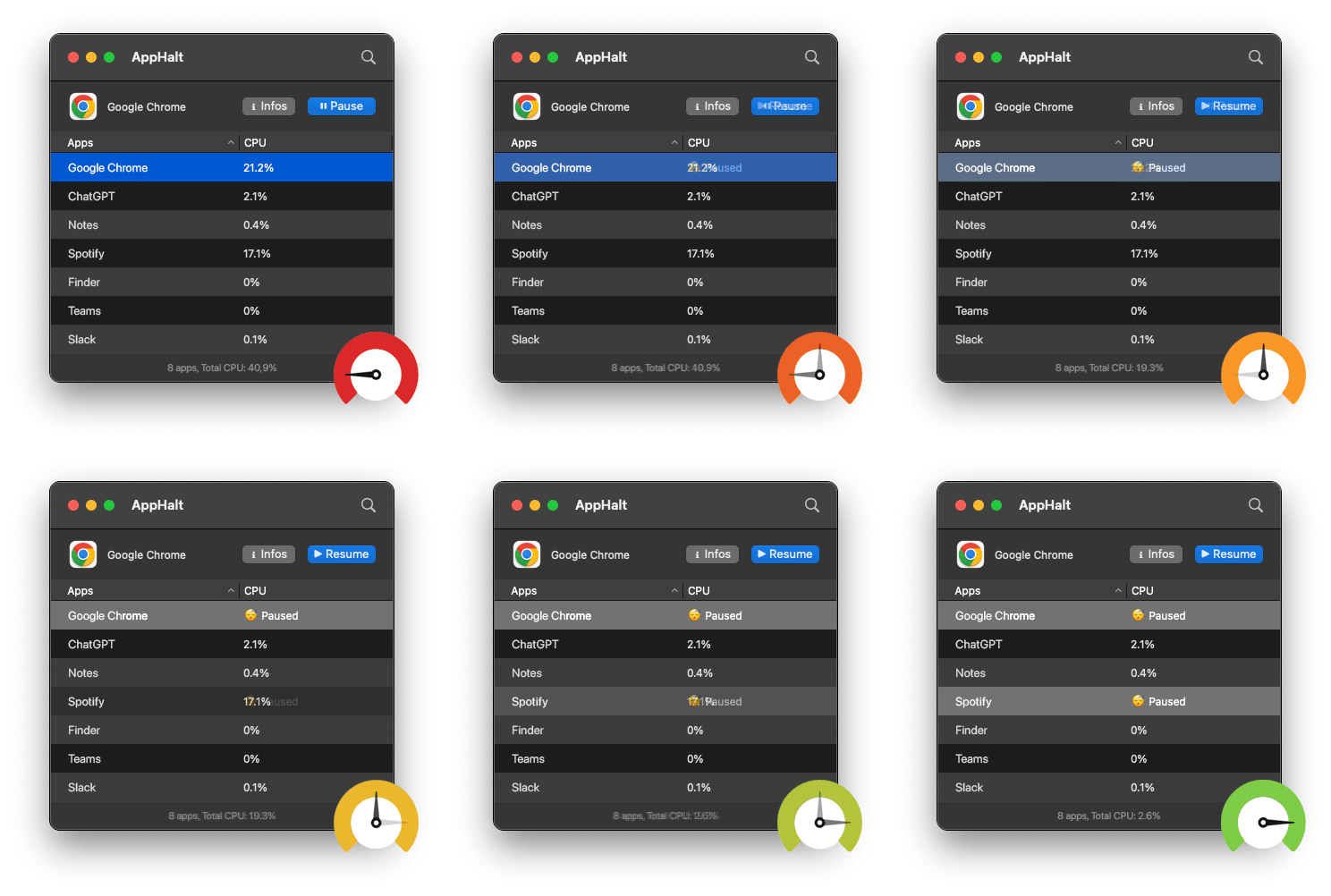
AppHalt helps by letting you pause unused apps without fully quitting them. This can reduce background CPU activity and help keep your Mac focused on the task in front of you.
Use AppHalt when:
- You want to keep an app open for later.
- You do not want the app doing background work now.
- Your MacBook Neo feels warm or slow.
- You are working on battery.
- You want fewer active apps competing for resources.
- You multitask but want more control.
Use normal quitting when you need to free memory more directly. Use AppHalt when you want to reduce background activity without fully breaking your workspace.
Do not pause apps that are saving, syncing important files, uploading, downloading, rendering, recording, exporting, compiling, or handling live work.
The best setup for a MacBook Neo with 8GB RAM
If you want the MacBook Neo to feel fast, set it up with discipline from day one.
1. Keep startup clean
Do not let every app open automatically. Review Login Items in System Settings and remove apps you do not need at startup.
2. Limit browser session restore
Do not reopen 40 old tabs every morning. Start clean and open what you actually need.
3. Use fewer menu bar utilities
Menu bar apps can look small but still use memory and CPU. Keep only the ones that truly help every day.
4. Watch cloud sync
Cloud sync is useful, but large syncs can add memory, CPU, network, and disk activity. Let big syncs finish while plugged in.
5. Restart heavy apps occasionally
Browsers, messaging apps, and creative tools can become heavier over long sessions. Restart them when they start feeling sluggish.
6. Pause unused apps
Use AppHalt to pause apps you want to keep open but inactive.
7. Check Activity Monitor instead of guessing
If the MacBook Neo feels slow, check Memory Pressure, not just how many apps seem open visually.
Should you buy MacBook Neo with 8GB RAM?
Buy it if your needs are simple, your budget matters, and you are comfortable keeping your workflow focused.
The MacBook Neo is a good choice if you:
- Want an affordable MacBook.
- Use mostly web, email, notes, documents, and streaming.
- Are a student with light to moderate needs.
- Do not use heavy professional apps daily.
- Are willing to manage browser tabs.
- Do not expect workstation-level multitasking.
Do not buy it if you:
- Want the machine to last years for heavy professional work.
- Use memory-heavy apps every day.
- Keep dozens of tabs open constantly.
- Run virtual machines.
- Do serious video editing.
- Need maximum performance headroom.
- Know you never close apps.
The MacBook Neo is not the wrong Mac. It is the wrong Mac for people who need more than it is designed to give.
8GB RAM on MacBook Neo: realistic workload table
| Workload | Expected experience | Best habit |
|---|---|---|
| 5-10 browser tabs, notes, music | Smooth | Keep tabs reasonable |
| 15-25 tabs, email, documents, chat | Usually fine, but watch memory | Close unused tabs and pause unused apps |
| Video call plus many tabs | Can feel heavier | Close or pause apps before calls |
| Figma or Photoshop plus browser | Possible but limited | Avoid too many background apps |
| Large video editing project | Not ideal | Use a more powerful Mac if frequent |
| Virtual machines or heavy dev setup | Not recommended | Choose more memory if possible |
| External display with many windows | Depends on app load | Do not let screen space become app clutter |
Common mistakes with MacBook Neo 8GB RAM
Mistake 1: Thinking 8GB is automatically bad
8GB is not automatically bad. For simple use, it can be enough. The problem is expecting it to behave like a high-end Mac under heavy multitasking.
Mistake 2: Keeping every browser tab open forever
Tabs are not free. Too many tabs can make the MacBook Neo feel much more limited than it actually is.
Mistake 3: Closing windows instead of quitting apps
On macOS, closing a window does not always quit the app. The app may still use memory in the background.
Mistake 4: Installing too many menu bar utilities
Small utilities can accumulate. On an 8GB MacBook, every background helper matters more.
Mistake 5: Ignoring Activity Monitor
Memory Pressure tells you more than guesswork. If your Mac feels slow, check the Memory tab before blaming the machine.
Mistake 6: Buying MacBook Neo for professional workloads
If your daily work is heavy, choose a Mac with more headroom. The MacBook Neo is an everyday Mac, not a workstation.
Best order to keep MacBook Neo fast with 8GB RAM
If you buy or already own a MacBook Neo, follow this order:
- Keep Login Items clean.
- Limit browser tabs.
- Remove unused browser extensions.
- Quit apps you are finished using.
- Pause unused apps with AppHalt.
- Watch Memory Pressure in Activity Monitor.
- Restart browsers and messaging apps occasionally.
- Let cloud sync finish while plugged in.
- Avoid too many menu bar utilities.
- Use a more powerful Mac for heavy professional work.
This is the difference between a MacBook Neo that feels clean and one that feels overloaded.
FAQ: is 8GB RAM enough for MacBook Neo?
Is 8GB RAM enough for MacBook Neo?
Yes, 8GB RAM is enough for MacBook Neo if you use it for browsing, documents, notes, email, streaming, schoolwork, and light multitasking. It is not ideal for heavy creative work, virtual machines, serious development, or dozens of browser tabs.
Is MacBook Neo good for students with 8GB RAM?
Yes, for most students who need web browsing, documents, video calls, notes, PDFs, and online classes. Students using heavy creative, coding, or engineering tools may need more performance headroom.
Can MacBook Neo handle Chrome with 8GB RAM?
Yes, but tab control matters. Chrome with a few tabs is fine. Chrome with dozens of tabs, extensions, web apps, and video pages can create memory pressure quickly.
Is 8GB unified memory better than normal RAM?
Unified memory is efficient because the system shares memory across different parts of the chip. But 8GB is still a fixed limit. It can be efficient, but it is not unlimited.
Can I upgrade MacBook Neo RAM later?
No. MacBook memory is not user-upgradable after purchase. You should choose based on your real workload before buying.
Why does my MacBook Neo feel slow with 8GB RAM?
It may feel slow because of too many browser tabs, apps running in the background, memory pressure, swap usage, cloud sync, login items, or heavy apps that exceed the machine’s comfort zone.
How do I check memory usage on MacBook Neo?
Open Activity Monitor, click the Memory tab, and check Memory Pressure, Memory Used, App Memory, Compressed Memory, and Swap Used.
Should I close apps or pause them with AppHalt?
Quit apps when you need to free memory directly. Pause apps with AppHalt when you want to reduce background activity without fully closing your workspace.
Is MacBook Neo enough for Figma?
It can handle light Figma work, but large files, many pages, multiple browser tabs, and other apps running at the same time can make 8GB feel tight.
Is MacBook Neo enough for video editing?
For occasional light edits, maybe. For regular video editing, large timelines, effects, or professional work, a Mac with more memory and performance headroom is a better choice.
Will AppHalt make 8GB RAM feel like 16GB?
No. AppHalt does not upgrade memory. It helps reduce unnecessary background activity so the MacBook Neo can focus more resources on the apps you are actually using.
Should I buy MacBook Neo or MacBook Air?
Buy MacBook Neo if your needs are simple and price matters most. Choose MacBook Air if you want more headroom, longer-term comfort, or heavier multitasking.
Useful official Apple resources
If you want to go deeper, these Apple resources are useful:
- MacBook Neo Technical Specifications
- View memory usage in Activity Monitor on Mac
- Activity Monitor User Guide for Mac
- Quit an app or process in Activity Monitor on Mac
- Open items automatically when you log in on Mac
Final thoughts: 8GB RAM is enough only if your workload matches the MacBook Neo
The MacBook Neo is not a bad Mac because it has 8GB RAM. It is a focused Mac.
For simple everyday use, 8GB can be enough. For students, casual users, writers, families, and people who mostly use web apps, documents, email, notes, and streaming, the MacBook Neo can make sense.
But if your work is heavy, messy, or full of open apps, 8GB will feel tight. Not because the MacBook Neo is broken, but because memory pressure is the natural result of asking a light machine to behave like a professional workstation.
The best MacBook Neo experience comes from controlled multitasking: fewer tabs, fewer startup apps, fewer background processes, and more attention to what is actually running.
If you buy the MacBook Neo, treat its 8GB memory like a limited workspace. Keep it clean, and it can feel fast. Fill it with everything, and it will push back.
🚀 Make 8GB Feel Less Crowded with AppHalt
AppHalt helps your MacBook Neo stop wasting resources on apps you are not using.
On a MacBook Neo with 8GB RAM, background apps matter. AppHalt gives you a smarter middle ground: pause unused apps, reduce background CPU usage, and keep your Mac focused on the work in front of you.
✅ Reduce background CPU usage.
✅ Help prevent overheating, fan noise, and battery drain.
✅ Pause unused apps without fully breaking your workflow.
✅ Keep your Mac feeling faster, lighter, and calmer.
📥 Want your MacBook Neo to feel lighter with 8GB RAM? Download AppHalt now.