A practical Mac tip
Viewers get a habit they can try immediately: pause unused apps instead of force-quitting their workspace.
AppHalt Press & Creator Room
AppHalt is the pause button for Mac apps. This page gives creators and reviewers the hook, current product visuals, script, facts, review flow, press assets, and creator partner details in one place.
What you gain: a clear video idea, a useful audience takeaway, less prep before recording, and an optional creator link if you want to earn from sales.
Best visual demo: pause an app, keep the window open, then resume it.Free to try. Pro review license available. Optional creator link: earn $3 per verified, non-refunded Pro sale.
What creators get
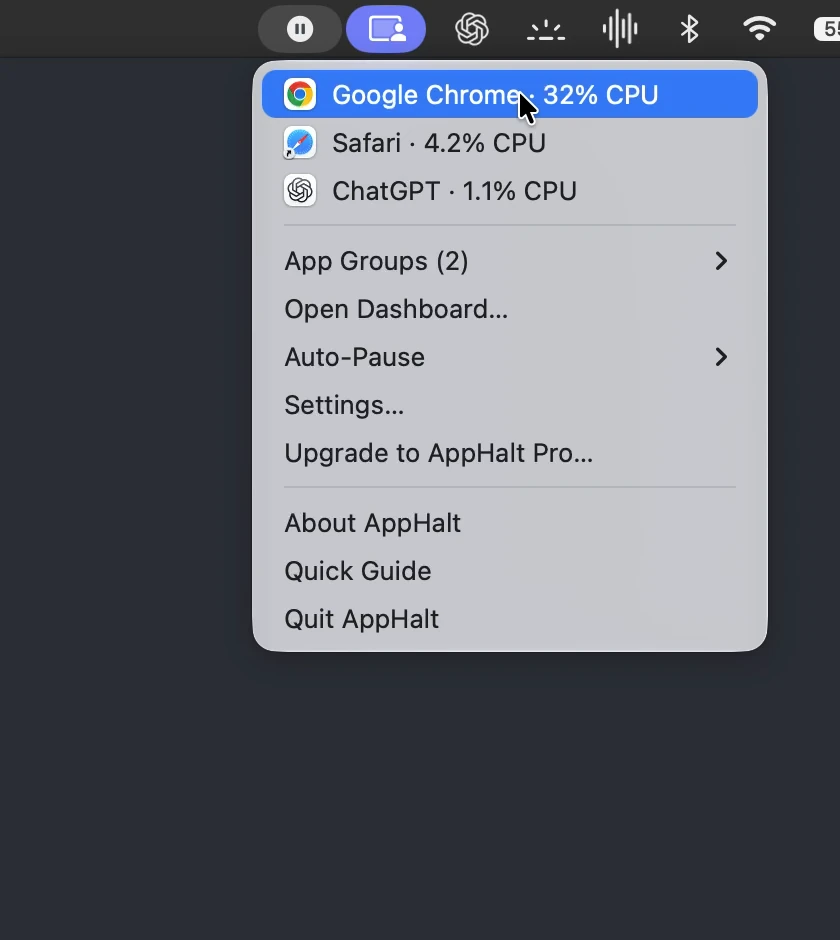
This is not a vague productivity app. AppHalt gives you a simple visual story: stop quitting apps just to calm down your Mac. Pause them, keep the workspace open, and resume when needed.
Viewers get a habit they can try immediately: pause unused apps instead of force-quitting their workspace.
“This Mac app adds a pause button to your apps.” It is short, visual, and understandable without technical setup.
Open apps, pause one, show it still open, resume it. The product explains itself on screen.
Request an optional creator link: earn $3 for each verified, non-refunded Pro sale made through your link.
Creator quick start
Use these four elements as your title, visual proof, story angle, and next step.
Best for Shorts, Reels, TikTok, newsletters, and quick YouTube intros.
This proves the core difference: AppHalt is not quitting or force-closing apps.
This makes AppHalt a workflow story, not a generic Mac utility.
Email contact@apphalt.app for a Pro review license and optional creator link before publishing.
Creator partner program
Creators can request a free AppHalt Pro review license and an optional creator link. If someone buys AppHalt Pro through your link and keeps the license after the refund window, you earn $3 for that sale.
Record with unlimited pausing, Auto-Pause, App Groups, exclusions, and advanced preferences.
Earn a fixed commission for each non-refunded AppHalt Pro license sold through your creator link.
This is not a paid positive review. Share your real opinion and disclose affiliate links clearly.
Request your Pro license, creator link, tracking details, and payout terms before recording.
Request license + creator linkRecommended disclosure: “This video includes an affiliate link. I may earn a commission if you buy AppHalt Pro through it.”
Creator program details
The goal is to make the partnership clear without turning the review into an ad. Review honestly, disclose the link, and make sure the tracking terms are confirmed by email before publishing.
Sales are tracked through your creator link or creator code, confirmed by email before publication.
If a purchase is refunded during the refund window, the related commission is not counted.
Payout timing and method are confirmed with each creator before they publish their review.
Creators should disclose affiliate links clearly in the video description, article, post, or pinned comment.
Video description copy
Use this in your YouTube description, newsletter, blog post, or pinned comment.
“AppHalt is a small Mac menu bar app that lets you pause apps instead of quitting them. It keeps windows, tabs, and documents open, so you can resume later. This video includes an affiliate link: I may earn a commission if you buy AppHalt Pro through it.”
Suggested disclosure and description. Adapt to your own voice and local rules.
30-second creator script
Use it as a voice-over, short-form script, newsletter paragraph, or review opening.
“If you keep too many Mac apps open, quitting them is annoying because you lose your workspace. AppHalt adds a pause button to your apps. You can pause Chrome, Slack, Teams, Figma, or other apps you are not using, keep their windows open, and resume them later. It is not a Mac cleaner. It just gives you control over what stays active.”
Suggested wording. Adapt freely for your own voice.
Video ideas
Open AppHalt, pause one app, show the window still open, resume it.
Compare force-quitting an app with pausing it while keeping the workspace intact.
Explain that AppHalt is about control over open apps, not deleting files or fake health scores.
Shot list
A creator should not have to invent the demo. These shots make the product clear without overclaiming.
Current media assets
Every asset below reflects the current public product facts and interface.
A clear AppHalt 1.9.2 pause-and-resume scenario in English.
Download demonstrationIncludes the native menu demonstration, icon, README, and verified fact sheet.
Download press kitUse the icon for directories, thumbnails, overlays, and article headers.
Download iconProduct facts, pricing, compatibility, contact, and review guidance.
Open fact sheetReview licenses and optional creator links are available for creators, journalists, and reviewers.
Request license and creator link| Product | AppHalt |
|---|---|
| Pitch | AppHalt is the pause button for Mac apps. |
| Creator hook | This Mac app adds a pause button to your apps. |
| Best visual | Pause an app, keep the window open, then resume it. |
| Category | macOS utility, menu bar app, productivity, app performance control |
| Compatibility | macOS 11.7 or later. Intel and Apple Silicon Macs. |
| Pricing | Free version available. Pro is a $9.99 one-time purchase. |
| Creator affiliate | Optional affiliate link available. Creators earn $3 per AppHalt Pro sale made through their link. |
| Review license | Creators can request an AppHalt Pro review license before recording. |
| Refund | 14-day money-back guarantee for AppHalt Pro. |
| Website | apphalt.app |
| Contact | contact@apphalt.app |
Why this story matters
Modern Mac users keep browsers, chat apps, design tools, development tools, and productivity apps open all day. Quitting apps can reduce activity, but it breaks the workflow. AppHalt gives them a calmer option: pause what can wait, keep the workspace open, and resume when needed.
Too many apps open, but quitting them breaks context.
The window stays open while the app is paused.
Pause instead of quit. Resume when needed.
Control over open apps, not a magic Mac booster.
Say this
Avoid this
Product overview
AppHalt lives in the macOS menu bar and gives users a simple way to pause and resume Mac apps.
Selected apps can be paused while staying visible in the workspace.
Windows, tabs, and documents remain where the user left them.
Paused apps can be resumed when the user needs them again.
Pro adds unlimited pausing, Auto-Pause, groups, exclusions, and advanced preferences.
Trust and positioning
AppHalt does not delete files, clean caches, uninstall apps, or invent scary system health scores. It gives users control over apps that are already open.
No cache cleaning, no hidden cleanup, no file deletion.
AppHalt pauses and resumes apps instead of closing them.
No scary warnings. No invented system problems.
Some protected system processes cannot be paused because of macOS restrictions.
The user decides what can wait and what must stay active.
Useful when the user wants a quieter Mac without losing context.
Suggested review flow
This flow helps reviewers test the core idea: pausing an app without closing the workspace.
Results may vary depending on the app, the process, background activity, and macOS restrictions.
Copy-ready descriptions
AppHalt is the pause button for Mac apps. It lets users pause unused apps without quitting them, keeping windows, tabs, and documents open.
AppHalt is a lightweight macOS menu bar utility that lets users pause unused or CPU-heavy apps without quitting them. It helps Mac users reduce unnecessary background activity while keeping their workspace intact.
AppHalt gives Mac users a middle ground between quitting apps and leaving everything running. It lives in the macOS menu bar and lets users pause selected apps, resume them anytime, create groups, define exclusions, and keep their workspace open.
Independent coverage
MacGeneration featured AppHalt as a utility that can pause apps consuming Mac resources without fully quitting them.
Read the articleAppHalt is listed on Product Hunt as “a pause button for your Mac apps”.
View on Product HuntAppHalt is listed on MacUpdate as a lightweight macOS utility for pausing CPU-heavy apps in the background.
View on MacUpdateFounder quote
“I built AppHalt because quitting apps is often too brutal. People want to keep their workspace open, but they also want their Mac to stay responsive. AppHalt gives them a middle ground: pause what can wait, resume when needed.”
Gabriel Nion, founder of AppHalt
Limitations
AppHalt works with many regular macOS apps, but some system processes and protected apps cannot be paused because of macOS restrictions.
Some system processes and protected apps cannot be paused.
Paused apps may behave differently depending on sync, media playback, background tasks, or permissions.
For important documents or active work, users should save changes before pausing an app.
FAQ
AppHalt is a macOS menu bar utility that lets users pause apps without quitting them.
No. AppHalt does not delete files, clean caches, uninstall apps, or invent system health scores. It gives users control over apps that are already open.
Yes. Creators, journalists, and reviewers can email contact@apphalt.app to request an AppHalt Pro review license.
Yes. Approved creators can request an optional creator link and earn $3 for every verified, non-refunded AppHalt Pro sale made through that link.
Sales are tracked through a unique creator link or creator code. Tracking details are confirmed by email before the creator publishes their review.
If a purchase is refunded during the refund window, the related creator commission is not counted.
Payout timing and method are confirmed with each creator before publication. This keeps the partnership clear before any video, article, or post goes live.
No. AppHalt welcomes honest coverage. Creators should share their real opinion and disclose affiliate links clearly.
No. AppHalt is designed to pause apps while keeping windows, tabs, and documents open.
No. Some system processes and protected apps cannot be paused because of macOS restrictions.
Yes. AppHalt offers a free version. Pro is available as a one-time purchase for users who want unlimited pausing, Auto-Pause, groups, exclusions, and advanced preferences.
Avoid claiming guaranteed speed or battery gains. AppHalt can help reduce unnecessary background app activity, but results vary depending on the app, process, and workflow.
Creator and press contact
Download the demo assets, try AppHalt Free, or request a Pro review license and optional creator link before recording.
